TRichView 24.3 - UI controls for FireMonkey again

News about TRichView, ScaleRichView, ReportWorkshop, RVMedia
Post Reply
Sergey Tkachenko
Site Admin
Posts: 18231
Joined: Sat Aug 27, 2005 10:28 am
Contact:

TRichView 24.3 - UI controls for FireMonkey again

Post by Sergey Tkachenko »

We are pleased to announce the new release of TRichView, version 24.3.

A trial version is available here: https://www.trichview.com/download/

The main new features:
  • improvements in TRVEditHelper component
  • actions for FireMonkey and a special button for them
  • improved widget for FireMonkey: collapsing to a single toolbar row + all paragraph properties
Support for Delphi 12 Community Edition has been removed from the trial version installer, and support for Delphi 13 Community Edition has been added.

Previous version:
https://www.trichview.com/forums/viewtopic.php?t=15458
Sergey Tkachenko
Site Admin
Posts: 18231
Joined: Sat Aug 27, 2005 10:28 am
Contact:

Improved TRVEditHelper component

Post by Sergey Tkachenko »

Improved TRVEditHelper component

TRVEditHelper is a new component for editing documents in TRichViewEdit. It is available in VCL, Lazarus, and FireMonkey. It is especially important in FireMonkey, because widgets and actions are based on it.

The TRVEditHelper component has two new methods: SetParaIndentsAndSpacing and SetParaBorderAndBackground.

These methods allow you to edit paragraph indents, spacing, borders, and background. They keep the background and borders inside the paragraph indents and spacing. TRichView allows them to extend outside these areas, but this is usually not desirable when editing normal documents.
Sergey Tkachenko
Site Admin
Posts: 18231
Joined: Sat Aug 27, 2005 10:28 am
Contact:

FireMonkey: TRVActionButton

Post by Sergey Tkachenko »

FireMonkey: TRVActionButton

The first version of FMX Tools introduced the TRVSVGPathButton component – a button with an SVG image.

This update adds another button component, TRVActionButton. It is similar to TRVSVGPathButton, but its image is selected from a predefined set using the Image property.

This component was created to make it more convenient to associate buttons with actions.

In addition to the standard properties, actions included in FMX Tools have the Image property that specifies an SVG image. When an action is assigned to a TRVActionButton, this property is automatically assigned to the corresponding Image property of the button.

Using SVG images is optional – as usual, you can assign a TImageList and select images by their index in the image list.

In addition, this button is square by default (the Square property) and hides its text (the HideText property).
Sergey Tkachenko
Site Admin
Posts: 18231
Joined: Sat Aug 27, 2005 10:28 am
Contact:

FireMonkey: actions

Post by Sergey Tkachenko »

FireMonkey: Actions

This update adds actions.

The main differences from the VCL version (RichViewActions) are:
  • in VCL, actions are the basis of the user interface; in the FMX version, they are an optional addition, while the main UI is implemented using the widget;
  • FMX actions must be added to the TActionList assigned to TRVControlPanel.ActionList, otherwise they will not work;
  • the editor for FMX actions must be specified explicitly in the TRVControlPanel.Editor property.
  • FMX actions have additional SVG image that can be synchronized with TRVActionButton's image
The first version includes actions for font styles (bold, italic, and so on), subscript and superscript, paragraph alignment, changing indents, and collapsing or expanding the widget.
Like the widget, the language of actions is specified in TRVControlPanel.

In this version of FMX Tools, action hints have been translated into many languages using AI.
Sergey Tkachenko
Site Admin
Posts: 18231
Joined: Sat Aug 27, 2005 10:28 am
Contact:

FireMonkey: improved widget

Post by Sergey Tkachenko »

FireMonkey: Improvements in TRVWidget

Editing paragraph properties

The widget has been significantly improved in this version.

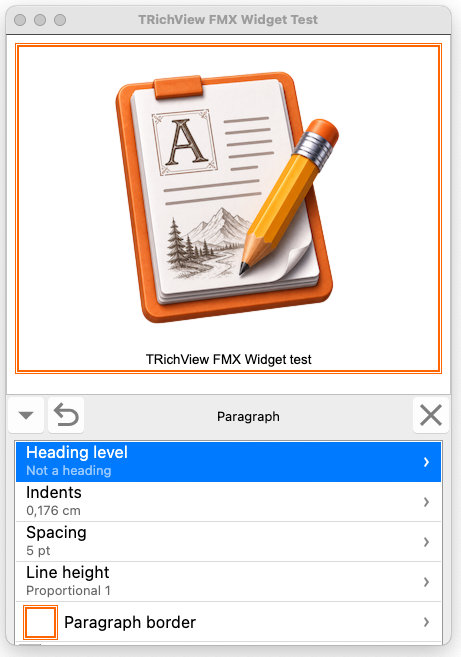
In the first version, its paragraph editing capabilities were limited to alignment and changing indents. In this version, it supports editing almost all paragraph properties except tab stops.
fmxtools-widget-paragraph.png
fmxtools-widget-paragraph.png (143.61 KiB) Viewed 29 times

New pages have been added to the widget for editing:
  • paragraph indents;
  • paragraph spacing;
  • line height;
  • heading level;
  • paragraph borders with subpages:
    • paragraph border paddings, which are also used as background margins.
    • visible border sides
Expanding and collapsing

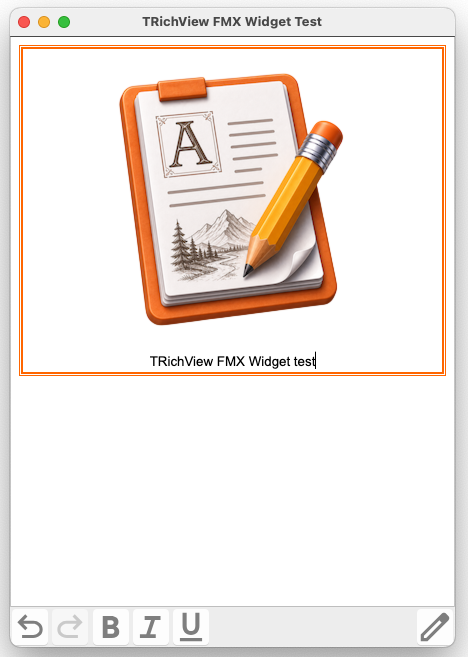
The widget can now be collapsed into a single-line toolbar containing the main commands.

Previously, the widget's close button did not perform any action (except for calling an event). Now, by default, it collapses the widget.
When collapsed, the widget has a button for expanding it again.
fmxtools-widget-collapsed.png
fmxtools-widget-collapsed.png (135.84 KiB) Viewed 29 times

If desired, these buttons can be removed from the widget and replaced with external buttons, for example buttons linked to TrvActionExpandWidget.

Removing optional features

Since the widget now allows editing almost all font and paragraph properties, it is suitable for professional document editing.
For simpler applications, especially mobile ones, it may provide more editing options than necessary.
The widget can now be simplified by removing editing features that you consider unnecessary.

Other changes

Previously, a back arrow button was used to return from a subpage. In this version, the back arrow is replaced with a checkmark by default. This makes it clearer that the changes will be applied when the button is pressed.
If you prefer the back arrow, you can restore the previous appearance using the BackButtonType property.

It is now possible to change the FireMonkey styles applied to all controls inside the widget.

Units of measure

The widget now includes controls for editing dimensions such as indents, spacing, margins, and border width.

Their units are specified in the same way as in VCL RichViewActions, using the TRVControlPanel.UnitsDisplay property.

If pixels are selected, all dimensions are displayed in pixels. For other units of measurement, small values are displayed in points.

Unlike VCL RichViewActions, the widget allows entering fractional pixel values.
Sergey Tkachenko
Site Admin
Posts: 18231
Joined: Sat Aug 27, 2005 10:28 am
Contact:

Integration in DeveloperExpress VCL

Post by Sergey Tkachenko »

Integration in DeveloperExpress VCL

Changes have been made to the editors for Developer Express VCL components to allow TcxTRichViewEdit to participate in Smart Paste.

Smart Paste is an AI-powered DevExpress feature that analyzes clipboard content and automatically assigns values to appropriate editors.

These changes increase the minimum required version of DevExpress VCL components to version 25.2 or newer.

If you use an older version, comment out
{$DEFINE DX_VER_25_2}
in ThirdParty\DevExpress\Source\cxTRichView.pas and rebuild the TRichView packages.
Post Reply