FireMonkey: Improvements in TRVWidget
Editing paragraph properties
The widget has been significantly improved in this version.
In the first version, its paragraph editing capabilities were limited to alignment and changing indents. In this version, it supports editing almost all paragraph properties except tab stops.
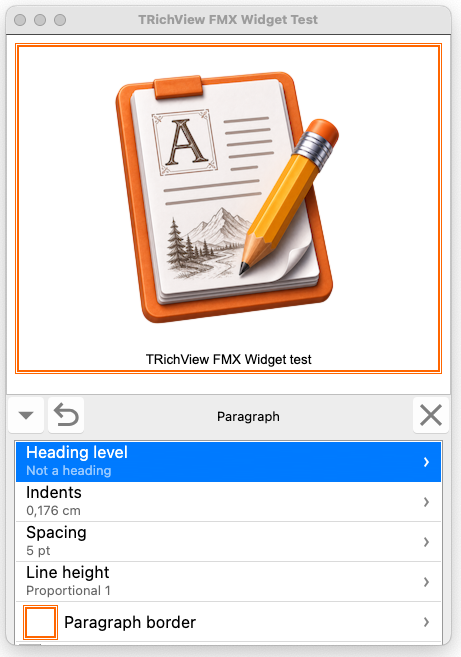
- fmxtools-widget-paragraph.png (143.61 KiB) Viewed 35 times
New pages have been added to the widget for editing:
- paragraph indents;
- paragraph spacing;
- line height;
- heading level;
- paragraph borders with subpages:
- paragraph border paddings, which are also used as background margins.
- visible border sides
Expanding and collapsing
The widget can now be
collapsed into a single-line toolbar containing the main commands.
Previously, the widget's close button did not perform any action (except for calling an event). Now,
by default, it collapses the widget.
When collapsed, the widget has a button for expanding it again.

- fmxtools-widget-collapsed.png (135.84 KiB) Viewed 35 times
If desired, these buttons can be removed from the widget and replaced with external buttons, for example buttons linked to
TrvActionExpandWidget.
Removing optional features
Since the widget now allows editing almost all font and paragraph properties, it is suitable for professional document editing.
For simpler applications, especially mobile ones, it may provide more editing options than necessary.
The widget can now be simplified by
removing editing features that you consider unnecessary.
Other changes
Previously, a back arrow button was used to return from a subpage. In this version, the back arrow is replaced with a checkmark by default. This makes it clearer that the changes will be applied when the button is pressed.
If you prefer the back arrow, you can restore the previous appearance using the
BackButtonType property.
It is now possible to
change the FireMonkey styles applied to all controls inside the widget.
Units of measure
The widget now includes controls for editing dimensions such as indents, spacing, margins, and border width.
Their units are specified in the same way as in VCL RichViewActions, using the TRVControlPanel.
UnitsDisplay property.
If pixels are selected, all dimensions are displayed in pixels. For other units of measurement, small values are displayed in points.
Unlike VCL RichViewActions, the widget allows entering fractional pixel values.