Page 1 of 1
RvFontCombobox behavior with multiple fonts
Posted: Fri Mar 20, 2026 11:09 am
by tomr
Hello RichView Support,
I have a question regarding the behavior of the RVFontComboBox.
In Microsoft Word, when selecting text that contains two or more different fonts, the font combo box appears empty, indicating mixed formatting.
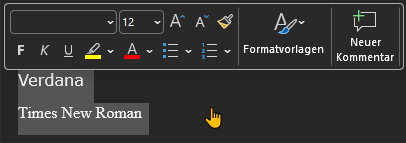
- Verhalten in Word.png (8.85 KiB) Viewed 18111 times
In RichView, however, when I replicate this scenario, one of the fonts is always displayed instead. The selected font depends on the direction of the selection:
- When selecting from top to bottom, the last font is shown.
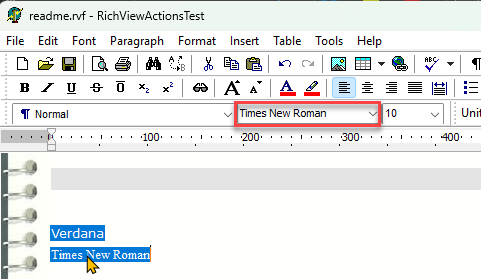
- Top to Bottom.png (24.01 KiB) Viewed 18111 times
- When selecting from bottom to top, the first font is shown.
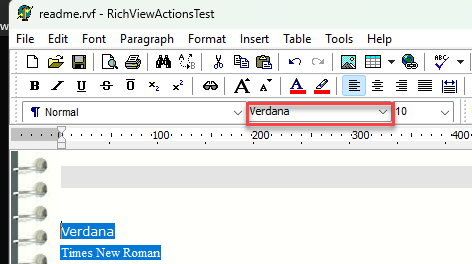
- Bottom To Top.png (22.3 KiB) Viewed 18111 times
Is there a way to replicate the behavior of Microsoft Word, so that the combo box indicates mixed fonts instead of displaying a single one?
Kind regards,
Tom
Re: RvFontCombobox behavior with multiple fonts
Posted: Fri Mar 20, 2026 1:33 pm
by standay
I used this code to do something like that:
Code: Select all
var
  fi, fi2: TFontInfo;
  i, FStart, FSOff, FEnd, FEoff: integer;
  rv: TCustomRichViewEdit;
 ...

  rv.GetSelectionBounds(FStart, FSOff, FEnd, FEoff, true);
  fi := rv.Style.TextStyles[rv.GetItemStyle(FStart)];

  for i := FStart to FEnd do
    begin
      fi2 := rv.Style.TextStyles[rv.GetItemStyle(i)];
      if fi.FontName <> fi2.FontName then
      begin
        cmbFontName.Text := '[Multiple]'; //or you could set to nothing
        break;
      end;
    end;
As far as I know, there's no other way other than to spin through your selection (you might have a different font in the middle of the selection, not just at the start or end). Keep in mind if you have a huge file and select it all, this can be slow. I stopped using it as I decided I didn't need it.
Stan (not with richview, just a user)
Re: RvFontCombobox behavior with multiple fonts
Posted: Sun Mar 22, 2026 6:13 pm
by Sergey Tkachenko
These combo-boxes display the font of the current text style.
Yes, it was done for performance reasons.
Re: RvFontCombobox behavior with multiple fonts
Posted: Mon Mar 23, 2026 8:20 am
by tomr
Hi,
Thank you both for your responses.
I will keep it that way then.
Re: RvFontCombobox behavior with multiple fonts
Posted: Tue Mar 24, 2026 3:50 pm
by tomr
Sergey Tkachenko wrote: Sun Mar 22, 2026 6:13 pm
These combo-boxes display the font of the current text style.
Yes, it was done for performance reasons.
Hi Sergey,
As you mentioned the current text style, I'm reporting a bug that can be reproduced in the demo.
Please enter the following text:
This is a text. This is another sentence
This is a new line
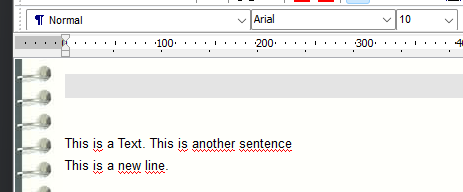
- Ausgangssituation.png (14.44 KiB) Viewed 17833 times
Now select "another sentence" and change the font (I used Webdings).
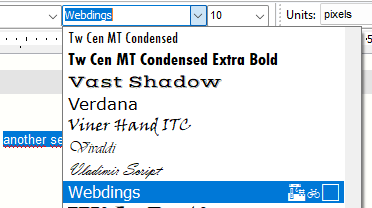
- Change Font.png (14.88 KiB) Viewed 17833 times
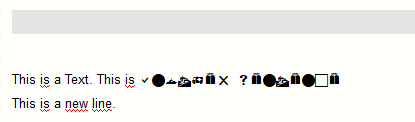
- Font Changed.png (3.53 KiB) Viewed 17833 times
After that, select the entire text. The font combo box will display the default font.
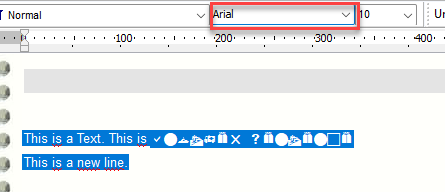
- Change Font Back.png (11.71 KiB) Viewed 17833 times
Now click into the font combo box and press Enter. As a result, the entire text changes to Webdings.
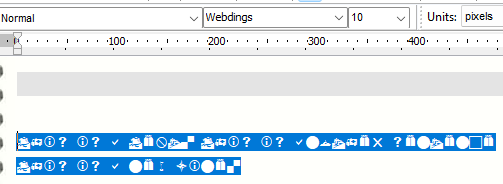
- Change Font After Enter.png (9.8 KiB) Viewed 17833 times
Shouldn’t it revert to the default font instead?
Re: RvFontCombobox behavior with multiple fonts
Posted: Fri May 29, 2026 7:53 pm
by Sergey Tkachenko
When you select a symbol font, RichViewActions auto-apply SYMBOL_CHARSET.
I agree, they should change SYMBOL_CHARSET to DEFAULT_CHARSET when applying a non-symbol font.
I will be implemented in the next update.
Re: RvFontCombobox behavior with multiple fonts
Posted: Mon Jul 13, 2026 12:21 pm
by Sergey Tkachenko
It turned out that the problem is different. Although the combo box text is "Arial", its ItemIndex still points to the "Webdings" item. I'll fix applying the selected font when pressing Enter in the next update.
Re: RvFontCombobox behavior with multiple fonts
Posted: Tue Jul 28, 2026 1:06 pm
by Sergey Tkachenko
Fixed in TRichView 24.2