Page 1 of 1
Resetting Text Style for Selected Items Without Losing Hyperlinks
Posted: Thu Jan 15, 2026 11:36 am
by tomr
Hello RichView Support,
I would like to implement a shortcut (Ctrl+Space) that resets the font of all items in the current selection. Unfortunately, I cannot use ApplyTextStyle, because it removes or replaces my existing hyperlinks.
Is there a way to change the text style of a specific item while preserving its hyperlink attributes?
I attempted to modify the StyleNo property of my TRVTextItemInfo. This seems to work internally, but the changes are not committed to the RichViewEdit control.
Am I missing a required update step, or is there a recommended way to apply a new text style to selected items without breaking hyperlinks?
Kind Regards
Tom
Re: Resetting Text Style for Selected Items Without Losing Hyperlinks
Posted: Fri Jan 16, 2026 8:17 am
by Sergey Tkachenko
If you use style templates (rve.UseStyleTemplates = True), the simplest solution to reset formatting is calling rve.ApplyStyleTemplate(-1).
Without style templates, you need to define the meaining of "resetting text style".
Do you want to assign:
- properties of rve.Style.TextStyles[0] to all non-hypertext styles;
- properties of rve.Style.TextStyles[0] + blue font color + underline to hypertext styles?
Or something different?
Re: Resetting Text Style for Selected Items Without Losing Hyperlinks
Posted: Fri Jan 16, 2026 10:19 am
by tomr
Hi Sergey,
Thanks for the quick reply.
We are not using StyleTemplates.
What I mean is resetting the font, similar to Microsoft Word.
Example:
I have a text that contains one hyperlink and some text with a different font (not the default font).
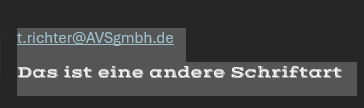
- Word Hyperlink und andere Schriftart.png (7.13 KiB) Viewed 13322 times
If I select the entire text and press Ctrl+Space, all fonts are reset to the default font.
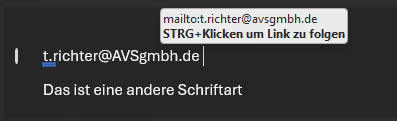
- Word Hyperlink und andere Schriftart nach Zurücksetzen.png (8.37 KiB) Viewed 13322 times
Important detail:
The hyperlink remains a hyperlink after resetting the formatting.
My idea was to:
apply the default text style to all non-hyperlink items, and
apply a duplicate of the default style (with the Jump/Action property enabled) to all hyperlink items.
Is this the recommended approach in TRichView, or is there a more idiomatic way to achieve Word-like “reset formatting” behavior?
Re: Resetting Text Style for Selected Items Without Losing Hyperlinks
Posted: Fri Jan 16, 2026 11:38 am
by Sergey Tkachenko
When style templates are used, ApplyStyleTemplate(-1) does the same work as MS Word: paragraphs are formatted using "Normal" styletemplate, hyperlinks are formatted using "Hyperlink" styletemplate, all other attributes are removed.
Without styletemplates, we need to answer to additional questions, such as: "What is the default font?".
The solution is using ApplyStyleConversion method with different processing of normal and hypertext styles.
Something like this.
This example resets the selection to "Times New Roman", 10. Font color is clWindowText for normal text, clBlue for hyperlinks. Hyperlinks are underlined.
Code: Select all
procedure TfrmMain.rveTemplateStyleConversion(Sender: TCustomRichViewEdit;
    StyleNo, UserData: Integer; AppliedToText: Boolean; var NewStyleNo:
    Integer);
var
  TextStyle: TFontInfo;
begin
  case UserData of
    0:
      begin
        TextStyle := TFontInfo.Create(nil);
        TextStyle.FontName := 'Times New Roman';
        if Sender.Style.TextStyles[StyleNo].Jump then
        begin
          TextStyle.Color := clBlue;
          TextStyle.Style := [fsUnderline];
          TextStyle.Jump := True;
        end;
        NewStyleNo := Sender.Style.FindTextStyle(TextStyle);
        TextStyle.Free;
      end;
  end;
end;

procedure TfrmMain.ToolButton15Click(Sender: TObject);
begin
  FActiveEditor.ApplyStyleConversion(0);
end;