ReportWorkshop 7.0 - charts, SVG shapes

News about TRichView, ScaleRichView, ReportWorkshop, RVMedia
Post Reply
Sergey Tkachenko
Site Admin
Posts: 18097
Joined: Sat Aug 27, 2005 10:28 am
Contact:

ReportWorkshop 7.0 - charts, SVG shapes

Post by Sergey Tkachenko »

We are pleased to announce a new release of ReportWorkshop.

This update is free for customers who ordered ReportWorkshop in 2024-2026.

Trial version: https://www.trichview.com/download/

New features:
  • charts in reports
  • SVG shapes
  • insertion of formatted documents (HTML, Markdown, or RTF) in strings

Previous version:
viewtopic.php?t=15202
Sergey Tkachenko
Site Admin
Posts: 18097
Joined: Sat Aug 27, 2005 10:28 am
Contact:

Charts. Chart catalog components

Post by Sergey Tkachenko »

Charts

Charts are the main new feature of ReportWorkshop 7. They consist of two main parts:
  • The document item TRVReportChartItemInfo.
    This item is inserted into the report template and is replaced with a final chart image during report generation. The item itself contains the data required to generate the chart, but it does not define the chart type or its appearance.
  • Chart catalog components.
    TRVReportChartItemInfo refers to one of the catalog items by name. That catalog item defines the chart type and visual appearance.
Supported chart types

ReportWorkshop supports charts that visualize data represented as sets of named numeric values. Typical examples are pie charts and bar charts. Other chart types can also be used, such as line, scatter, and area charts (with the limitation that values on the X axis must be evenly spaced).

A chart may contain multiple data series.

Chart catalog components

ReportWorkshop 7 provides two chart catalog components. Both are based on third-party components.

TRVReportTeeChart
pie chart catalog.png
pie chart catalog.png (140.67 KiB) Viewed 26 times
The first one is TRVReportTeeChart, which is based on the TChart component by Steema Software. A free version of TChart is included with Delphi (though it is not always installed by default).

Compatibility:
  • VCL: Delphi 2007 and later
  • FireMonkey: Delphi XE6 and later (Design-time editing requires Delphi XE7 or later)
If you are still using older Delphi versions (D6–D2005), you can use TRVReportTeeChart by creating it in code. Design-time creation is not available in these Delphi versions.

This component contains a set of chart templates (Catalog). When a chart item is added to a report, it is linked to one of the templates in this component (by template name). During report generation, chart images are created based on the selected template.

You can edit this component at design time. A command named “Add Default Catalog Items” is added to the component’s context menu; it calls the AddDefaultCharts method to add a set of chart templates to the Catalog property.

You can also edit individual collection items. After selecting the ChartTemplate property in the Object Inspector, you can expand it (by clicking the [+] icon on the left) and edit individual TChart properties. Alternatively, you can click the […] button to open a special property editor that allows you to preview this TChart and invoke its component editor.

TRVReportDxChart
bar chart catalog.png
bar chart catalog.png (132.75 KiB) Viewed 26 times
TRVReportDxChart is a nearly identical component based on TdxChartControl by Developer Express (VCL only).
It has similar properties and methods, as well as a similar component editor and property editors at design time.
Multiple series in multiple diagrams in the same chart image are supported.

Both components described above are installed automatically by the ReportWorkshop installers, provided that the corresponding third-party component library is already installed in Delphi.

To make the report generator use such a component, create it and assign it to TRVReportGenerator.ChartCatalog.
Sergey Tkachenko
Site Admin
Posts: 18097
Joined: Sat Aug 27, 2005 10:28 am
Contact:

Charts: Document item

Post by Sergey Tkachenko »

Charts: Document item

TRVReportChartItemInfo has the following properties.

The CatalogItemName property links this document item to an item in the catalog component's collection described above.

It is important to understand that only this string is stored in the RVF document; the actual chart definition and its properties are stored in the application, in the catalog component. This means that a report template saved in an RVF file will be processed correctly only when it is loaded by an application that uses a catalog component with the same or compatible catalog items.

The second important property is Series. It is a collection of items that describe the data sources for the chart series.

Data values are specified by a pair of properties: DataQuery (a data query, such as a table name or an SQL SELECT statement) and DataValueString (a field name in the result of DataQuery, or an expression). These properties are required.

Optionally, you can specify labels (names of data items). They are defined using the LabelsDataQuery, LabelsValueString, and Labels properties.
The following options are possible:
  1. Labels are taken from the same data query as the values
  2. Labels are taken from a separate data query
  3. Labels are specified as a list of values directly in the item
  4. Labels are not specified
To avoid overcomplicating the user interface, the chart creation dialog supports only the first option (from the same query as the data) and the last option for specifying labels.

This document item also defines the chart title, series names, and the icon used to represent the chart in report editing mode.
Sergey Tkachenko
Site Admin
Posts: 18097
Joined: Sat Aug 27, 2005 10:28 am
Contact:

Charts: User Interface

Post by Sergey Tkachenko »

Charts: User Interface

The user interface is provided by a new action, TrvrActionInsertChart. When executed, it displays a dialog for defining chart properties. The dialog contains several pages, the most important of which are the first two.

On the first page, you select a chart template from the catalog and enter the chart title.
On the second page, you specify the data for the chart series.

After the chart has been inserted into the report, its properties can be edited using the TrvActionItemProperties action.

This dialog has been translated into all languages already supported by ReportWorkshop using AI. I kindly ask the ReportWorkshop translators to review these translations and make corrections where necessary.

If you created your application based on the ReportEditor demo projects for newer Delphi versions, you already have an icon for this action in your image list.
Sergey Tkachenko
Site Admin
Posts: 18097
Joined: Sat Aug 27, 2005 10:28 am
Contact:

Insertion from HTML, Markdown and RTF codes

Post by Sergey Tkachenko »

Insertion of HTML, Markdown and RTF codes

Before this version, ReportWorkshop allowed inserting formatted documents (RTF, HTML, Markdown, DocX) only from database fields (memo and binary fields). It did not support converting string values into these formats.

In this update, you can specify that a string contains a document in HTML, Markdown, or RTF format. This enables additional scenarios, such as inserting a document from a report variable or from the result of an expression.

Limitation: HTML code must contain '<html' or '<head' substring.

Example 1: displaying HTML stored in a variable

Code: Select all

{$set %greeting = "<html>hello <b>world</b>"}
{%greeting html}
Example 2: displaying Markdown from an expression

Code: Select all

{'="hello **world**"' markdown}
Both these examples show:
Hello world
Sergey Tkachenko
Site Admin
Posts: 18097
Joined: Sat Aug 27, 2005 10:28 am
Contact:

SVG Shapes

Post by Sergey Tkachenko »

SVG shapes

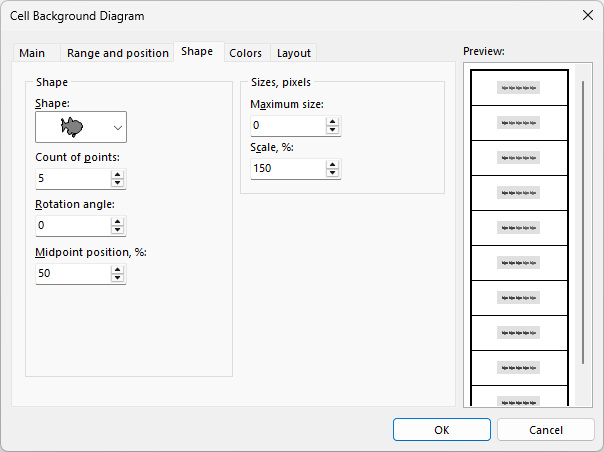
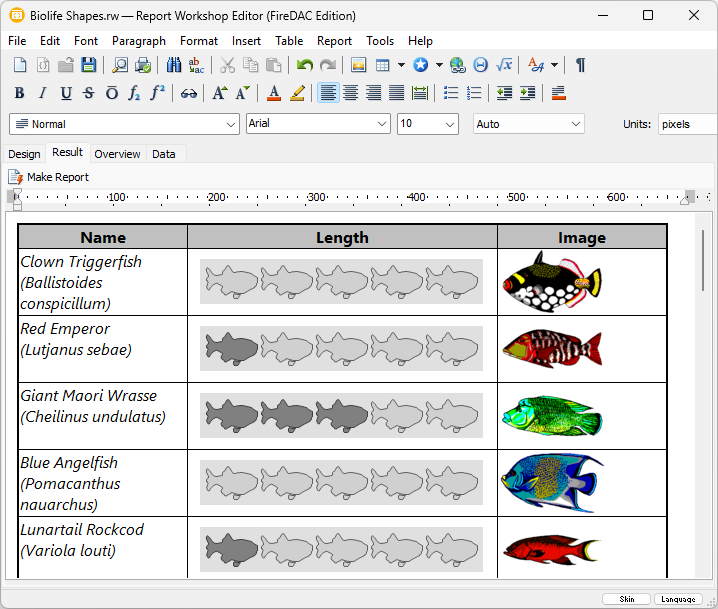
ReportWorkshop uses shapes. Their primary purpose is to visualize values within table cells. For example, you can specify that a certain shape should be repeated a number of times proportional to a value (such as a star rating).

Shapes can also be used as components and as TRichView document items.

Before this version, several predefined shape types were supported, including circles, regular polygons, stars, gears, flags, smileys, and several other shapes.

You can now extend these shapes with custom ones defined using SVG paths.

When I added this feature, I had to decide where SVG paths should be stored: in the application (for example, as a property of TRVReportGenerator), in the RVF document (so that a single list would be available to all value visualizers and document items), or individually in visualizers and elements. Each of these options has its own pros and cons.
In the end, I chose the second option — storing them in the document itself, that is, in the DocObjects collection.

The DocObjects collection contains items that are saved together with the document in RVF format. This collection is unusual in that it typically contains items of different classes.

In particular, to store SVG paths, the TRVSVGPathsDocObject class was implemented. This class has a Paths property, which is a collection of named SVG paths. Value visualizers and document items can refer to an SVG path by its name in this collection.

It is assumed that an item of type TRVSVGPathsDocObject is added to the collection as a single instance. For convenience, a set of helper functions is provided to work with this object.

Here is the example how to add two SVG paths in a document.
If you use RichViewActions, the best place for this code is TrvActionNew.OnNew event (it occurs when creating a new empty document).

Code: Select all

const
  LampStr = 'M480-80q-26 0-47-12.5T400-126q-33 0-56.5-23.5T320-206v-142q-59-39-'+
    '94.5-103T190-590q0-121 84.5-205.5T480-880q121 0 205.5 84.5T770-590q0 77-35.5'+
    ' 140T640-348v142q0 33-23.5 56.5T560-126q-12 21-33 33.5T480-80Zm-80-126h160v-'+
    '36H400v36Zm0-76h160v-38H400v38Zm110-118v-108l88-88-42-42-76 76-76-76-42 42 88 '+
    '88v108h60Z';
  SailStr = 'm120-420 320-460v460H120Zm380 0q12-28 26-98t14-142q0-72-13.5-148T500-'+
    '920q61 18 121.5 67t109 117q48.5 68 79 149.5T840-420H500ZM360-200q-36 0-67-'+
    '17t-53-43q-14 15-30.5 28T173-211q-35-26-59.5-64.5T80-360h800q-9 46-33.5 84.'+
    '5T787-211q-20-8-36.5-21T720-260q-23 26-53.5 43T600-200q-36 0-67-17t-53-43q-'+
    '22 26-53 43t-67 17ZM80-40v-80h40q32 0 62.5-10t57.5-30q27 20 57.5 29.5T360-'+
    '121q32 0 62-9.5t58-29.5q27 20 57.5 29.5T600-121q32 0 62-9.5t58-29.5q28 20 58'+
    ' 30t62 10h40v80h-40q-31 0-61-7.5T720-70q-29 15-59 22.5T600-40q-31 0-61-7.5T480-'+
    '70q-29 15-59 22.5T360-40q-31 0-61-7.5T240-70q-29 15-59 22.5T120-40H80Z';
 
var
  DocObject: TRVSVGPathsDocObject;
begin
  DocObject := GetSVGPathDocObject(MyRichView, True);
  with DocObject.Paths.Add do
  begin
    Path := LampStr;
    Name := 'lamp';
    ViewBox.SetValues(0, -960, 960, 0);
  end;
  with DocObject.Paths.Add do
  begin
    Path := SailStr;
    Name := 'sailing';
    ViewBox.SetValues(0, -960, 960, 0);
  end;

end;
Sergey Tkachenko
Site Admin
Posts: 18097
Joined: Sat Aug 27, 2005 10:28 am
Contact:

Changes in demo projects

Post by Sergey Tkachenko »

New demo projects
  • VCL:
    • Delphi\FireDAC\7 - Chart\ (FireDAC components + InterBase DB + TRVReportTeeChart)
    • Delphi\IBX\7 - Chart\ (InterBase Express components + InterBase DB + TRVReportTeeChart)
    • Delphi\DevExpress\Chart\ (FireDAC components + InterBase DB + TRVReportDxChart)
  • FireMonkey:
    • Delphi.FMX\FireDAC.IB\7 - Chart\ (FireDAC components + InterBase DB + TRVReportTeeChart)
    • ]Delphi.FMX\FireDAC.SQLite\7 - Chart\ (FireDAC components + SQLite DB + TRVReportTeeChart)
These demo projects show how to create reports with charts in code. They contain two pages.

On the first page, a report with two pie charts is created based on the same table: animal size and animal weight.

On the second page, a master–detail report is created: a bar chart showing population and area of countries, where countries are grouped by continent (a separate chart is created for each continent).
The second page also demonstrates how to use expressions as values: to display population and area charts on the same scale, the population value is divided by 10 (that is, measured in tens of people).

ReportEditor demos

TrvrActionInsertChart has been added to implement the Insert | Chart command in all VCL versions of ReportEditor demo projects. However, chart catalog components were not added, so that the demos could still be used even if TChart is not installed in Delphi.

Because of this, the chart insertion command is disabled. To enable it, include the unit Demos\Delphi_Common\TeeChartDm.pas in the project. This unit contains a DataModule with TRVReportTeeChart, which will be used automatically without requiring any additional code.
Post Reply